Other Data Modifications
The following data modifications are available by left-clicking on a variable in the Data panel.
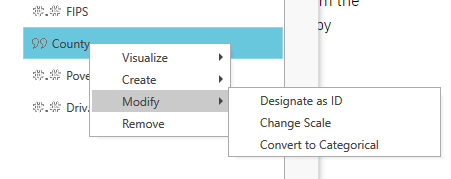
Designate an ID Variable
The following is a necessary step in preparing to merge two data files in Vesta using an ID variable.
If the ID variable is not listed in the drop-down menu of the import window it first needs to be designated as an ID variable from the Data panel.
- Cancel the import
- Left-click on the name of the ID variable in the Data panel
- Select the option "Modify", followed by "Designate as ID”
This data modification is permanent.
Change Scale
Changing geographic scale is also reachable as the "Change of scale" step from the Preprocess hub — see Preprocess and Changing Geographic Scale for how the calculation works.
Convert to Categorical Variable
This modification converts qualitative data to a categorical variable in order to use the conveyed parameters in analyses and visualizations. Categorical variables can be type of forest animal (wolf, fox, bear), material used to construct a water pipe (lead, copper, PVC), soil type (silt, clay, sand), or land uses (agrarian, industrial, residential). This is useful in comparing and contrasting the behavior of empirical data based on different groupings.
- Left-click on the name of the desired variable in the Data panel
- Select the option "Modify", followed by "Convert to Categorical". A new categorical variable will appear listed at the bottom of the variable list in the panel view.
This is also reachable as the "Convert to categorical" step from the Preprocess hub — see Preprocess.
Logarithmic Transform
A variable can be log-transformed as the "Log transform" step from the Preprocess hub — see Preprocess. Choose natural log (ln) or log10; zero and negative values return a missing value rather than an error.
Create a Binary Variable
Vesta builds a binary (0/1) variable from a condition on a source variable — combine several conditions with and/or, or drag a slider to pick a numeric range — rather than by recoding an existing categorical variable's groups. Vesta generates a sensible name for the result automatically. This is reachable as the "Create binary variable" step from the Preprocess hub — see Preprocess.
Once you have a binary variable, you can use it for various analyses such as logistic regression to model the probability of occurrence of the binary outcome. Additionally, you can visualize the spatial distribution of the binary variable on maps, or explore its relationships with other variables using scatterplot.