Vesta Advisor
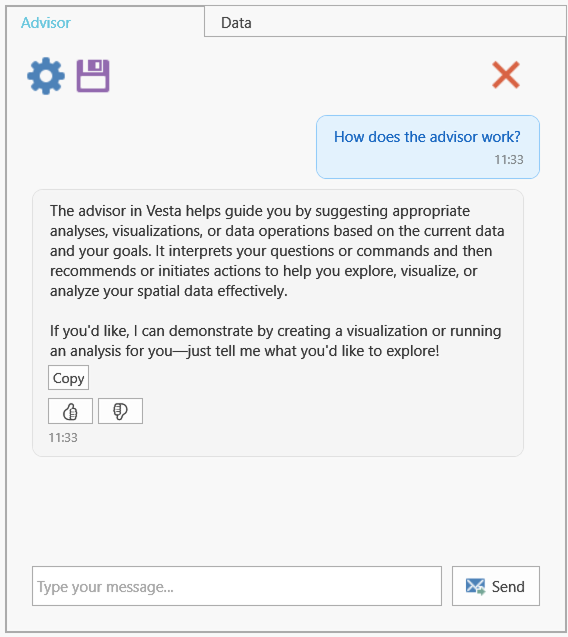
The Vesta Advisor is powered by an AI language model designed to assist with spatial data analysis and visualization within the Vesta application. The Advisor's knowledge and responses are tailored specifically to Vesta's capabilities and workflows to help users effectively use the software.
What the Advisor Can and Cannot Do
The Advisor suggests what analyses to perform but does not perform those analyses for you. It knows variables and metadata, but not the data values in the variable columns from the imported data file.
If a user asks the Advisor to perform an analysis from the chat by selecting a suggested action button, the Advisor knows what analysis was performed but does not know what the result values are. The Advisor can direct the user to what results might be of interest but does not interpret the results for the user.
For larger requests, the Advisor can lay out a numbered, multi-step plan and work through it with checkpoints you can stop at, pausing to ask you when something is ambiguous rather than guessing.
The Advisor also flags caveats on its own, including small sample sizes, variables that overlap too much, categories being treated as numbers, and spatial pattern left in the residuals.
Data Safety and the Advisor
Vesta does not send, store, or remotely save any data users import into the software. Any data that is imported into Vesta is only available to the user and is not stored or retained outside of the user's session in Vesta. Data saved to Vesta projects or exported via reports and visualizations are only available to the user.
The Advisor operates within this same data protection framework. Interactions with the Advisor do not expose data to external parties or networks. The Advisor only processes and responds based on dataset metadata loaded within Vesta and does not share or transmit data elsewhere. The values within variables are not visible to the Advisor.
Fetching and Importing Data
The Advisor can discover and import data from Vesta's supported online sources — CDC data catalogs (PLACES, Chronic Disease Indicators, Drug Poisoning Mortality, YRBSS, BRFSS), the U.S. Census Bureau (ACS, Decennial, Population Estimates, the International Database), Environmental Public Health Tracking (EPH), the World Bank, FAOSTAT, WOAH/WAHIS animal-health records, HDX HAPI, OpenTopography, WorldClim, MODIS satellite imagery, GRIP4 road density, WorldPop population density, Gridded Livestock of the World and Global Livestock Production Systems, and SSA Baby Names — as well as from your own local files.
Before importing, the Advisor looks up exactly what a source contains rather than guessing. For sources like Census tables and CDC EPH Tracking, it finds the real measure or variable codes and asks you for the specific parameters it needs — for example, which Census vintage, geographic level, or measure to use. When a measure is available in more than one form (county vs. state, 5-year vs. annual), it presents the choices and asks which one you want. It never invents a variable code or measure ID.
For local files, if you don't give a file path, the Advisor opens the file-import dialog so you can pick the file yourself; if you provide a full path, it can prepare the import directly. Either way, it previews the file's structure before importing, but that preview does not expose the actual values in the file. The Advisor can look up this kind of source information mid-conversation, too — not only when preparing an import.
An import the Advisor performs has the same effect as doing it yourself through the Data menu: it happens inside your Vesta project and is not sent, stored, or shared outside your session. Once a dataset is in your project, the Advisor can help run analyses on it — the same as with any dataset you import yourself — but this still happens entirely inside your workspace, consistent with the data protection policy above.
Users should be aware that geographic locations are used to create Maps, so users may choose to use ID proxies if working with sensitive data. For more details on how Vesta handles user data, licensing, and third-party integrations, see the Vesta Data Security Page.
Exporting a Conversation
An Advisor conversation can be exported to Word or PDF, including any caveats it raised and summaries it produced.